Tuesday, 21 August 2012
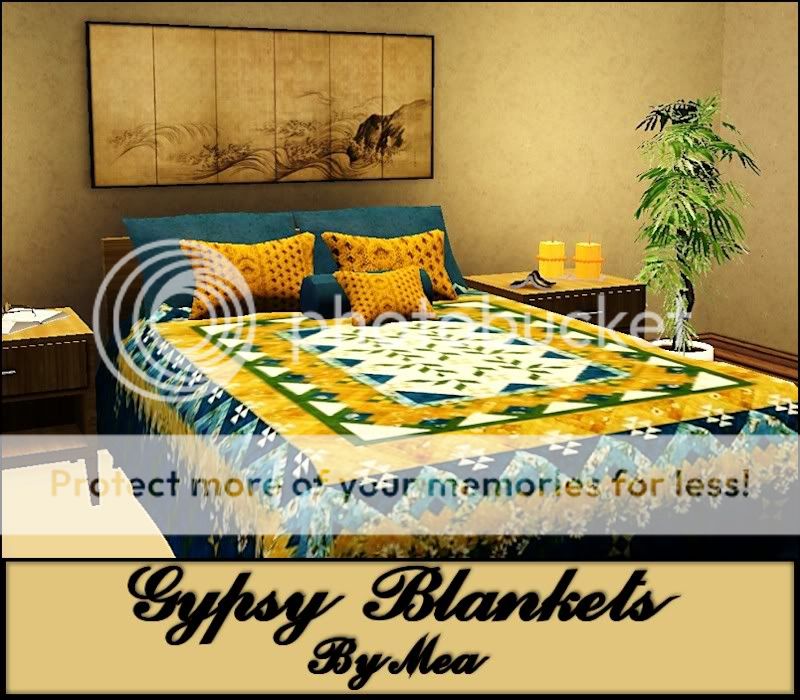
Blankets
It's been a while since I last posted something here. I made these blankets or bedspreads, with a Gypsy Theme, today and I thought I should share them with you. So please feel free to download if you like them
Credit and thanks for the Mesh: AweSims
Tuesday, 21 February 2012
Lonely Tree
I named this set of paintings - Lonely Tree. Set consist of eight(8) Paintings by the artist Theo Dapore, with his permission, converted to Sims Paintings
Credit: Simpossible for original Mesh - Painting Always
Credit: For original paintings by Theo Dapore - http://www.originalabstractart.net/
Tuesday, 26 April 2011
Start Somewhere Challenge
Heather Cottage
This is my entry in this challenge. It is a 1 double bedroom 1 bathroom starter house. Lot is 20x20.
Furnished 17981 and unfurnished 11951. No CC except for 1 pattern from a unknown creator. Credit to the creator.
This is my entry in this challenge. It is a 1 double bedroom 1 bathroom starter house. Lot is 20x20.
Furnished 17981 and unfurnished 11951. No CC except for 1 pattern from a unknown creator. Credit to the creator.
File size - 1,902 KB
Sunday, 13 March 2011
New Residential Lots
I have 2 new residential lots for you to download.
3 Bedrooms, 4 Bathrooms, Family room, Entrance Hall, Laundry, Entertainment area and Double garage. Big windows to let the sun in, hence the name Sunshine Manor.
Furnished 186,230
Unfurnished 103,466
Lot Size: 40x30
Price Unfurnished: 52710
Price Furnished: 103706
Lot Size: 40x30
Sunshine-manor-by-oumamea
3 Bedrooms, 4 Bathrooms, Family room, Entrance Hall, Laundry, Entertainment area and Double garage. Big windows to let the sun in, hence the name Sunshine Manor.
Furnished 186,230
Unfurnished 103,466
Lot Size: 40x30

Download HERE
Mea_myne_haus
Small but cozy house. 2 Bedrooms, 1 Bathroom, Laundry and double garage.
Price Unfurnished: 52710
Price Furnished: 103706
Lot Size: 40x30


Download HERE
Sunday, 6 March 2011
Problems with lots sinking into the ground or raising the ground - SOLVED
Here is how I did it (If someone else wants to try it):
1. Open the game and go to the world that you would like to place this lot in.
2. Make sure you have the correct size lot available but don't place your lot yet.
3. Click on the lot and select the edit lot tool. Wait for the lot to load.
4. Once the blank lot is loaded do the following:
1. Enter the cheat space (Ctrl+Shift+C) and type testingcheatsenabled true press enter
2. Cheat space again and type constrainFloorElevation false press enter
3. Cheat space type setimportedterrainoffset {value} press enter (See note below about the {value} you have to add here)
4. Now reverse the cheat commands constrainFloorElevation true, testingcheatsenabled false, remember to press enter after each command
5. Go to edit town and place your lot
If all went well your lot should now be perfect!!!
ps The command setimportedterrainoffset {value} The value here can be diffrent from what I have used. I tried diffrent values until I got it to where it should be. If your lot is raised instead of sinking you can use a negative value for instance -3.
I hope this will help someone that is also having a similar problem.
Here is how I did it (If someone else wants to try it):
1. Open the game and go to the world that you would like to place this lot in.
2. Make sure you have the correct size lot available but don't place your lot yet.
3. Click on the lot and select the edit lot tool. Wait for the lot to load.
4. Once the blank lot is loaded do the following:
1. Enter the cheat space (Ctrl+Shift+C) and type testingcheatsenabled true press enter
2. Cheat space again and type constrainFloorElevation false press enter
3. Cheat space type setimportedterrainoffset {value} press enter (See note below about the {value} you have to add here)
4. Now reverse the cheat commands constrainFloorElevation true, testingcheatsenabled false, remember to press enter after each command
5. Go to edit town and place your lot
If all went well your lot should now be perfect!!!
ps The command setimportedterrainoffset {value} The value here can be diffrent from what I have used. I tried diffrent values until I got it to where it should be. If your lot is raised instead of sinking you can use a negative value for instance -3.
I hope this will help someone that is also having a similar problem.
Friday, 6 November 2009
Something for the sims children
A Hooded-Dress with a Jacket for the girls. Download at the link below the pictures.
Subscribe to:
Posts (Atom)